Meet TINO
TINO Is Not Office! It's what happens when you stop treating documents like files on a desktop, and start treating them like a shared, living workspace instead.
Rationale
Most of our business processes at confirm IT are fully automated — infrastructure as code, CI/CD pipelines, reproducible deployments. Nearly everything we do is treated as code: auditable, versioned, and automatable. Document production was the last holdout. We used Apple Pages for a while — more usable than O365, but still impossible to automate in any meaningful way.
The answer was obvious: treat documents the same way we treat everything else. In practice, that meant:
- Web-based and self-hosted
- Version-controlled with full history
- Authentication and authorisation via OpenID Connect
- API for automation and integration
- Real-time collaboration
- Reusable templates and corporate design as packages
No existing tool ticked all the boxes. The first question was which document format to build on. Markdown and reStructuredText lack the typographic control needed for polished deliverables. LaTeX offers that control, but the learning curve makes it impractical for non-technical contributors.
Typst struck the right balance: expressive enough for professional output, approachable enough for the whole team. Typst's own editor comes close to a complete solution and even offers a self-hosted variant — but while the compiler is open source, the web editor is a closed-source commercial product. We needed something we could fully control: open source, deeply integrated with our identity provider and Git workflows, and extensible to our use cases.
So we built TINO: a collaborative, self-hosted editing platform around Typst.
TINO is born

TINO started as a small internal experiment. A handful of us wanted to see if we could replace our creaking Apple Pages workflow with something built around Typst. No roadmap, no budget, just a weekend project and a shared frustration.
It didn't stay small for long. Once real-time collaboration and Git-backed versioning actually worked, we started moving our documents over, one contract and one report at a time. The experiment outgrew its "side project" label faster than we expected.
At some point we asked ourselves the obvious question: why keep this to ourselves? TINO doesn't compete with anything we sell; it solves a problem every team like ours has. So we cleaned it up, wrote proper docs, and made it open source.
Docs, docs, docs
An internal tool only needs to make sense to the people who built it. An open source one doesn't get that luxury. Before we could hand TINO introduce to the world, we had to write down everything we'd been carrying around in our heads.
That turned into a proper documentation site covering deployment and configuration, day-to-day usage, and the architecture behind it. Writing it forced us to question a few decisions we'd never really questioned before, which in turn has further improved the product.
You'll find all of it at docs.tinotype.com.
TINO, Typst and templates
We didn't stop at replacing Apple Pages. We built a dedicated Typst package for our corporate layout, so every document carries the same design without anyone touching a stylesheet.
On top of that we built templates for the documents we produce most: contracts, offers, letters.
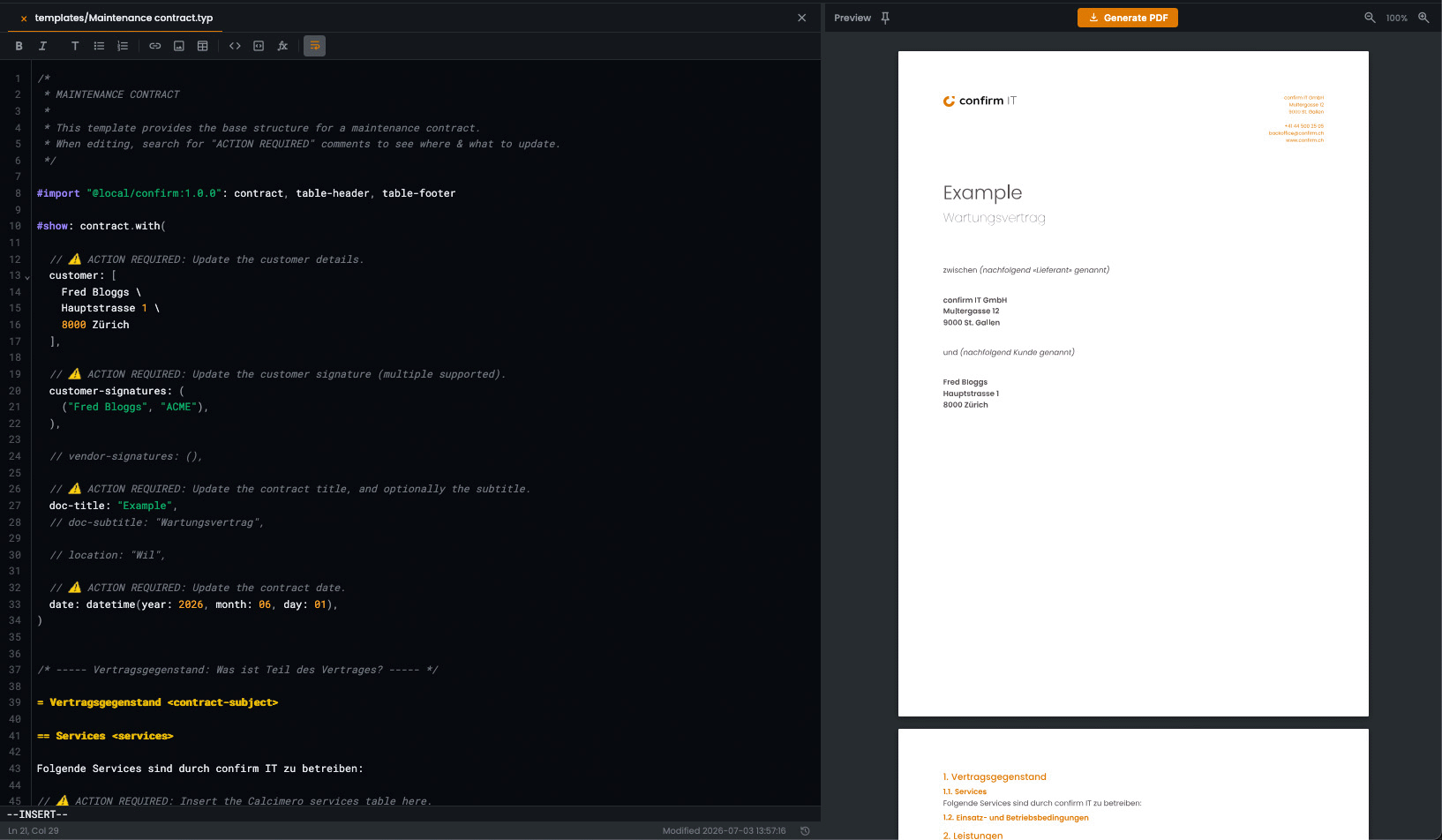
While we were at it, we have included comments in the Typst markup; short notes explaining what each field is for. This ensures that everyone in the team can fill in a template without having to guess. This matches our Zen rule #4:
Clarify ambiguities to prevent assumptions.
Provide the AI with an MCP
Templates got us most of the way, but filling one in by hand is still a biomechanical process. So we went a step further and built an MCP server for TINO, exposing buckets, files and the editor itself as AI tools.
At first we used a locally hosted LLM. Partly out of curiosity, partly because we didn't want customer data anywhere near a third-party model before we trusted the setup ourselves.
Once that worked, we connected Calcimero, our price calculator, and our ERP via MCP to the same LLM.
Now a quote can be turned into a complete contract in a matter of minutes: Calcimero prices it, the ERP manages the subscription and invoice, while the model drafts, fills in, and commits the document straight into TINO.
Providing instructions
Remember those comments we put into our templates? The Typst compiler ignores them, but an LLM doesn't. That's when we realised we could feed the LLM instructions.
A eureka moment for all of us, because that meant:
- We can provide the LLM with context, rules and guidelines
- We can write the instructions in plain prose — no code, no low-code, just plain text
- We can provide different instructions in different templates
That changed how we write templates: suddenly we had the "real" business logic documented where it belongs. Nobody has to fire up another Word document, open a wiki, or rely on know-how gathered from colleagues.
Here are a few examples:
== Vertragsbeginn <contract-start>

// ⚠️ ACTION REQUIRED: Update the contract start date.
Die Wartungsleistungen beginnen am 1. Juni 2026.
== Wartungsfenster <maintenance-windows>

// ⚠️ ACTION REQUIRED: Optionally define the maintenance window, or remove this chapter.
== Backup <backup>

// ⚠️ ACTION REQUIRED: Remove this chapter in case backup is included in the services.
Die Sicherung (Backup) der Daten liegt in der alleinigen Verantwortung des Kunden und ist nicht Bestandteil der Leistungen von confirm IT.
And it isn't just documentation: the LLM applies it whenever it creates a new document:
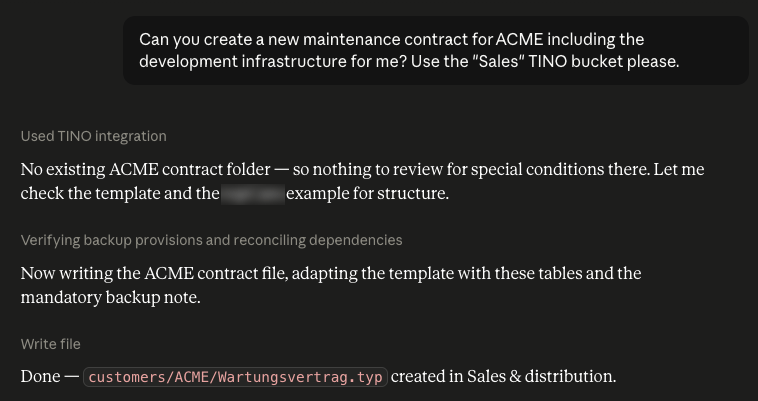
As you can see, anyone on the team can add or change instructions without writing a single line of code. The next generated document simply follows them:
Verdict
For a long time, documents were an unstructured part of our workflow. Now the process has been standardised and the results are impressive: faster, more consistent and auditable.
TINO is open source and still a young project. If all of that sounds familiar, contact us, or contribute to the project.
And if you'd like to automate document authoring in your own company, let's talk. We've done it for ourselves, and we'd love to do it for you.
This insight was drafted by a real human, polished by AI, and double-checked by another human. The last word always goes to someone who drinks coffee. (The AI wanted this footnote removed.)
You might also like:
From chaos to order
Air is just another metric